LeoPicture as colorimeter and color statistics analyser.
LeoPicture can be used as colorimeter (chroma-meter) for analyzing colors in the whole image in its selected area(s). As well you will be able to compare standard color with color of selected area.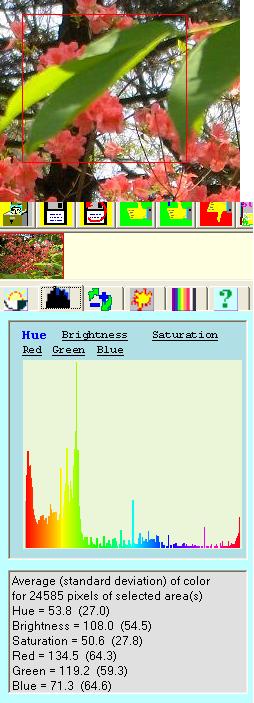
Color.
A concept of the color is quite difficult by itself even if we are talking about single point (pixel) of the image. A definition of the color of the area that contains number of pixels is considerable more sophisticated as description of one person and population of town. One person has his height, crowd can be characterized by average value of heights, standard deviation and histogram of distribution.
Color of one pixel.
Physically color of one point can be characterized by reading of three cone
neighbor cell detectors on retina of eye. Each of these detectors has its
own area wavelength sensitivity in spectra. Making very lazy simplification
one can named them red, green and blue receptors. Reading these sensors
sent to brain where normalized can be presented in form RGB (
R ed
Green
Blue) color space. Historically and for pure convenience
of manipulation in computers values these prime colors are in
range from 0 to 255 each.
Combination of these three numbers gives millions of different colors.
Other natural way to characterize a color is not from point of
view of observer but characteristic of photons bean. Here will
be simplification too, sorry. One can describe ray of light with
wavelength of photons, signal/noise ratio and intensity and .
There characteristics can be associated with numbers named
Hue, Saturation and B rightness. Hue represent
color by name itself and lies in range 0-359. The range rightly
hints that it is like red, blue, green projectors illuminate
circle screen in tree opposite directions. So 0 and 359 of hue
is neighbor colors. Strange. Saturation measure how far the color
are from grey, 0 grey, 100 is naive color. Brightness shows a
grade between black and white. From 0 for black to 255 for white.
In LeoPicture brightness is just average of RGB values. Note that in other
approach brightness are defined as maximum of RGB values. We
don´t think that it is much sense as soon pure
pure red , and very pink for example
will have the same value of brightness 255. Not too practical
from our point of view. When we taken brightness as average pure
red had 85 and very pink around 240.
Color of object.
Here is unavoidable terminology confusion.
What is object? Is image of forest on the other side of pond
a object? It is very subjective.
We defined an object here as a part of picture (whole picture
in same cases) observer interested in. Pure practically.
LeoPicture presents all six described above characteristics of
color (Red, Green, Blue, Hue, Saturation, Brightness) inside selected
area in form of raw statistical data - average, standard deviation,
histogram of distribution. on the picture is shown an example
for the Hue for selected part of the picture:
By clicking on name of color attribute user can invoke the histogram
of its distribution in intuitive self-explanatory manner.
Average and standard deviation of Hue is calculated taken into
account its tricky self bitten tail nature that especially noticeable
in area of gluing 0 with 360.
When color analyses tab is active user can change selected area
instantly observing updated histogram of color characterization.
Note that modification of image in tab of common operation as doing selected
area brighter, contrasted, more colorful will not affect result
of analysis until they will be accepted.
Quality control.
A standard operation procedure of quality control on the base
of color can be described as following:
In picture of etalon sample of material most characteristic area will be selected and "Get current as standard" link clicked.
Then for image of each tried manufactured material select area that is fully inside. There will be two histogram overlapped one of standard and other of checked sample. Normalized in range 0 -100 coefficients of similarity by each of color characteristics will be calculated and displayed as well.
It will be up to user to investigate threshold of similarity coefficients to establish pass value or some combinations of them.