Rotate, zoom, size, and deform image with LeoPicture
LeoPictire software application permits to modify digital photo image
as whole. One main principle the user has to remember is to accept changes
before initiating next operations.
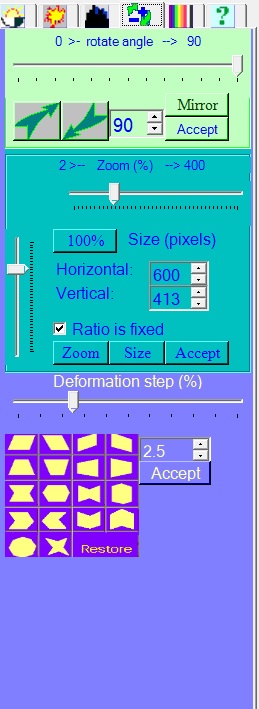
Rotate
Image can be rotated clockwise or counter-clockwise direction
by given angle by clicking on corresponding buttons. Photo image
will be enlarged to keep whole old picture inside.
Mirror
Photo image can be mirrored by clicking on button "Mirror".
Size and zoom
Digital photo image can be scaled up or down from its original
size in interval from 2% to 400%.
There are options:
-
to set exact size of modify picture in pixels.
-
to fix width/height ratio or change them independently.
-
by clicking to "100%" to return to original size.
-
by clicking button "Size" image will take new size without change.
If new dimensions will be less than original, part of picture will be
cut. In case of increasing dimensions new areas will be filled with white
color.
-
by clicking button "Zoom" image will take new size and correspondingly
transforming to fill all picture.
-
Buttons "Accept" are set near by to remind necessity to approve changes
before moving to other tasks.
Deform photo image
By clicking on the corresponding pictograms the image will deform correspondingly by the percentage step given by user. Any number of deformations in any order can be done before accepting the changes. By clicking on text "Restore" image will set to the original state.
Jun. 27, 2017; 10:28 EST
Comments: